Repair Ticket Management Software for Cell Phone Repair Stores

RepairNest POS helps you manage every repair from intake to completion with complete control and clarity. Easily create repair tickets, assign technicians, track real-time status, and link parts, all in one system. Stay organized, reduce delays, improve team efficiency, and deliver a seamless experience to your customers with a streamlined repair workflow built specifically for repair businesses.

Repair Management

Manage Every Repair From Intake to Completion

RepairNest POS gives you full control over your repair workflow from creating tickets to delivering completed jobs all in one system.

Repair Software

What Is Repair Tracking Software?

Repair tracking software helps you track, manage and organize every repair job in your store, from the moment a device is checked in until the customer picks it up. With RepairNest POS, you can create repair tickets, assign technicians, track status and link parts in real time, in the same system you use to sell phones and accessories.

Key Features

Helping you manage repairs faster and deliver jobs effortlessly.

Repair Ticket Management

Easily create detailed repair tickets with device information, reported issues, and service notes in one place.

Real-Time Status Tracking

Easily track every repair stage from intake to in-progress to completed with clear and real-time updates.

Technician Assignment

Easily assign repair jobs to technicians and monitor workload, progress, and overall performance in real time.

Parts & Inventory Linking

Easily attach parts and accessories to repair tickets for accurate tracking and better inventory management.

Customer Communication

Easily keep customers informed with repair status updates and timely notifications throughout the entire process.

Repair History Tracking

Easily maintain a complete history of repairs for each customer and device for future reference.

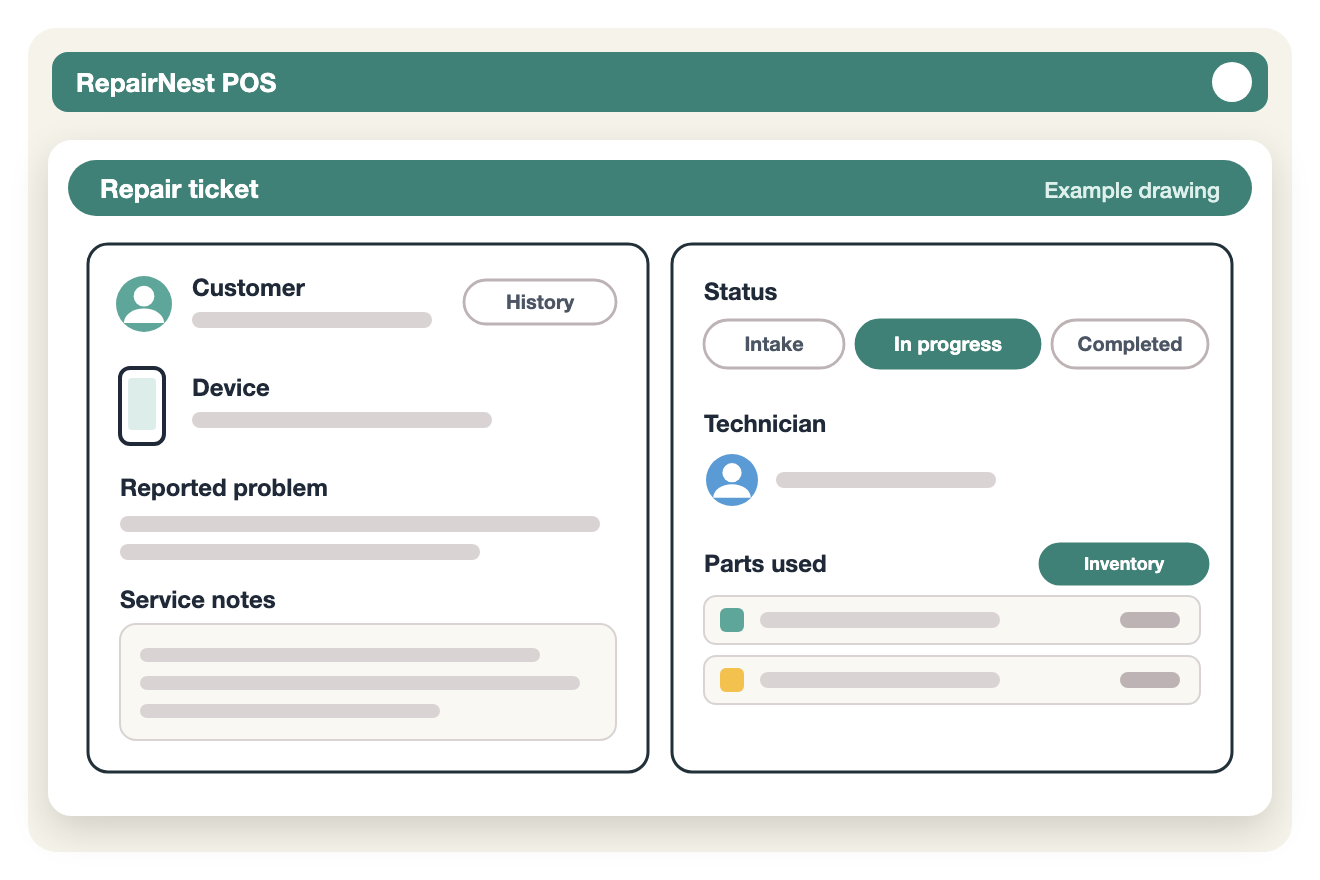
Illustration of a RepairNest POS repair ticket showing customer, device, reported problem, service notes, status, technician and parts used

Repair Tickets

What a Repair Ticket Records

Every repair gets its own ticket when the device comes in. The ticket keeps everything about the job in one place, so anyone at the counter can answer a customer’s question without hunting for paperwork.

  • Customer: linked to the customer’s record, so you can see their past repairs.
  • Device: the device details you record at check-in.
  • Reported problem: what the customer says is wrong.
  • Service notes: what the technician found and did.
  • Status: where the job is, from intake to in progress to completed.
  • Technician: who is responsible for the repair.
  • Parts used: parts and accessories linked to the ticket from your inventory.

Repair Workflow

From Check-In to Pickup

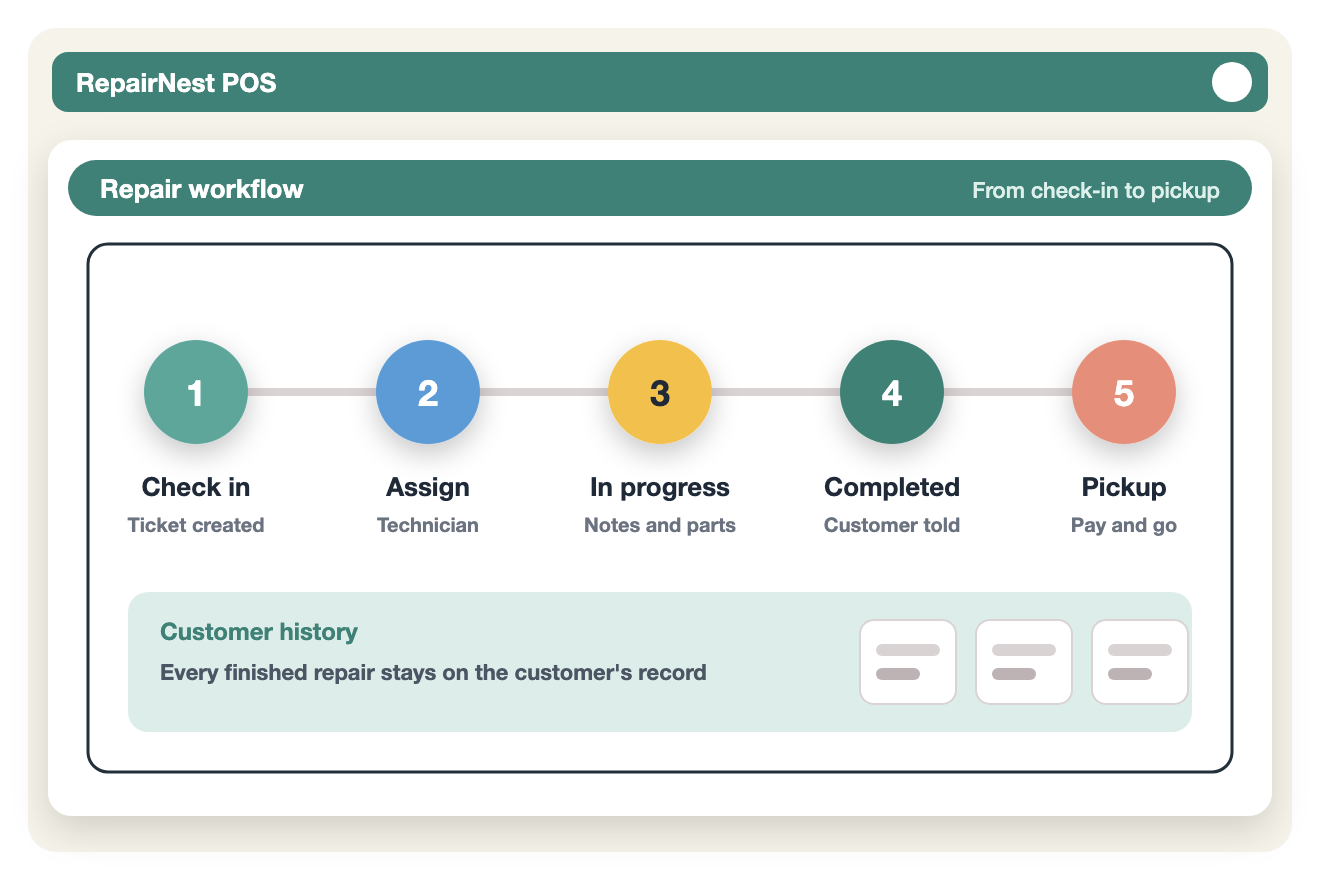
RepairNest POS follows the way a repair counter already works. A typical job moves through five steps:

  1. Check in. Create the repair ticket, choose the customer or add a new one, and record the device and the problem.
  2. Assign. Give the job to a technician so everyone knows who owns it.
  3. Repair. The technician moves the ticket to in progress, adds service notes and links the parts used.
  4. Complete. Mark the repair completed and keep the customer informed with a status update.
  5. Pickup and pay. Ring up the repair together with any accessories the customer buys in one sale, by card or cash, with dual pricing if you use it.

When the job is closed, it stays in the customer’s repair history for future reference, such as a returning customer or a warranty question.

Illustration of the repair workflow: check in, assign a technician, in progress, completed, pickup and payment, with the repair saved to customer history

See a Repair Ticket in Action

Try RepairNest POS yourself: create a sample repair ticket, assign it to a technician and check it out with an accessory sale.

Technicians, Parts and History

Run the Repair Bench, Not Just the Counter

Technician assignment

Assign each repair to a technician and follow each person’s workload and progress, so owners can see who is working on what without asking around. If you pay commission on repairs, the employee commissions module can work it out as a flat amount or a percentage.

Parts linked to repairs

Attach the parts and accessories used to the repair ticket. You can see what each job used, keep your stock accurate and check what is on the shelf before you promise a repair time. Vendors and purchases are handled in the same system with vendor and purchase management.

Customer history

Every repair is saved to the customer and the device. When a customer comes back, you can see what was fixed before, the parts used and the technician’s notes. Customer records also connect to CRM and loyalty rewards.

Repair Business

Built for Every Repair Business

RepairNest POS is designed for all types of repair businesses helping you manage repairs, servicing, and technical workflows with ease and efficiency.

FAQ

Repair Ticket Software: Common Questions

What is repair ticket software?

Repair ticket software gives every repair job a digital ticket that records the customer, the device, the problem, the technician and the parts used, and tracks the job’s status until pickup. RepairNest POS combines it with a full point of sale, so the same system also handles payments, inventory and customers.

How is repair tracking software different from a regular POS?

A regular POS records sales. Repair tracking software also follows the job between check-in and pickup: who is working on it, what stage it is at and which parts it used. RepairNest POS does both.

Can I assign repairs to specific technicians?

Yes. Each ticket has an assigned technician, and you can follow each technician’s workload and progress.

Are the parts used in a repair linked to inventory?

Yes. Parts and accessories are attached to the repair ticket they were used on, so you can see what each job used and keep your inventory accurate.

Can I keep customers updated on their repair?

Yes. RepairNest POS lets you keep customers informed with repair status updates and notifications while the job is in the shop.

Can I see a customer’s past repairs?

Yes. Each customer and device keeps a full repair history.

Does it work for computer and game console repair shops?

Yes. The same repair tickets work for phones, computers and consoles. See computer repair shop software and game console repair shop software.

Does it run online or on Windows?

Both. RepairNest POS works online, and it can also be installed on Windows.

How much does it cost?

There is one plan with everything included, repair tickets too: $100 per month, or $80 per month billed annually ($960 a year), per location. Shops with more than one location can contact us for multi-store pricing. See pricing.

Can I try it before I buy?

Yes. Click Try Yourself to create a sample repair ticket and sale.

Simplify Your Repair Workflow Today

Take control of your repair operations with software built for repair stores.