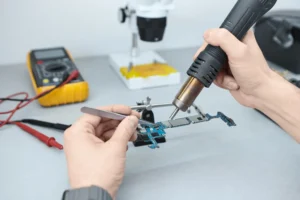

Repair businesses need more than a simple checkout system. A phone repair shop, electronics repair store, or device service business has to manage repair tickets, technician assignments, parts inventory, customer history, warranties, payments, and reporting. This is why many owners search for both repair shop management software and POS software when looking for the right system.
Although the two terms are often used together, they do not mean exactly the same thing. POS software usually focuses on sales and transactions, while repair shop management software focuses on the full operational workflow of a repair business. The best solution for repair shops often combines both into one connected platform.
This guide explains the difference between repair shop management software and POS software, what each system does, and why repair businesses should choose software that supports both sales and service operations.
What Is POS Software?
POS software, or point of sale software, is designed to process customer transactions. In a standard retail environment, it helps businesses sell products, accept payments, print receipts, manage basic inventory, and view sales reports.
For repair businesses, a POS system is still important because customers may pay for repairs, accessories, refurbished devices, parts, or service packages. However, basic POS software is usually not enough to manage the complete repair workflow. It can handle the payment side of the business, but it may not support repair tickets, device tracking, technician management, or warranty history.
What Is Repair Shop Management Software?
Repair shop management software is built to manage the operational side of a repair business. It helps track repairs from device intake to completion, assign jobs to technicians, record diagnostics, manage customer information, monitor parts usage, and store repair history.
This type of software is especially useful for phone repair shops and electronics repair businesses because every repair job has multiple steps. A device is checked in, diagnosed, repaired, tested, updated, and returned to the customer. Repair shop management software gives structure to this process so teams can work more efficiently and reduce mistakes.
The Main Difference Between POS Software and Repair Shop Management Software
The simplest way to understand the difference is this: POS software manages the sale, while repair shop management software manages the service workflow. A retail POS may be enough for businesses that only sell products, but repair businesses need a system that can manage both transactions and repair operations.
For example, a customer may bring in a phone for screen replacement. The business needs to create a repair ticket, record the device IMEI or serial number, assign the job to a technician, use parts from inventory, update the customer, collect payment, and maintain a record for future warranty support. A basic POS system can only support part of that process.
Why Repair Businesses Need More Than Basic POS Software
A repair business becomes difficult to manage when repair tracking happens outside the POS. If staff use spreadsheets, notebooks, sticky notes, or separate apps to track repair jobs, important information can become scattered. This increases the risk of delays, lost devices, incorrect inventory counts, and poor customer communication.
Repair businesses need software that connects the front counter, technician bench, inventory room, and reporting dashboard. When POS and repair management features work together, the business gains better visibility, faster workflows, and more accurate data.
Key Features Repair Shop Management Software Should Include
Repair Ticket Management
Repair ticket management is one of the most important features for any repair business. It allows staff to create tickets at device intake, record repair details, assign jobs, update statuses, and track each job until completion. This creates a clear workflow and helps prevent devices from being forgotten or misplaced.
Device and IMEI Tracking
Repair shops work with individual devices, not just product SKUs. A strong repair management system should support IMEI and serial number tracking so each device can be linked to its repair history, customer profile, warranty information, and future service records.
Parts Inventory Management
Parts inventory must be connected to repair activity. When a technician uses a part, the system should update inventory automatically and show how parts affect repair profitability. This helps reduce stock errors, prevent shortages, and improve purchasing decisions.
Technician Assignment and Productivity Tracking
Repair shop management software should help managers assign jobs to technicians and track productivity. This makes it easier to measure turnaround time, balance workloads, identify bottlenecks, and improve repair shop efficiency.
Customer History and Warranty Records
Customer history is critical for repeat repairs, warranty claims, and long term service quality. A good system stores past repairs, devices, notes, payments, and warranty details in one place so staff can serve returning customers faster and more accurately.
Reporting and Business Analytics
Repair businesses need reporting that goes beyond daily sales totals. Repair performance, parts usage, technician productivity, inventory movement, repeat customers, and profitability reports help owners make data driven decisions.
When Basic POS Software May Be Enough
Basic POS software may be enough for a small retail store that only sells products and does not manage repair jobs. It can also work temporarily for a new repair business with very low repair volume and simple operations.
However, once a repair shop starts handling multiple repairs per day, managing technicians, stocking parts, or offering warranties, basic POS software usually becomes limiting. At that stage, the business needs repair shop management features built into the system.
Why a Combined Repair POS Platform Is the Best Choice
The best option for most repair businesses is not choosing between POS software and repair shop management software. It is choosing a repair focused POS platform that combines both. This gives the business one system for transactions, repair tickets, inventory, technicians, customers, warranties, and reporting.
A platform like RepairNest POS is designed for repair businesses that need more than basic checkout tools. It supports repair workflows, device tracking, parts management, customer history, staff visibility, and sales operations in one connected system.
Final Verdict
POS software and repair shop management software are connected, but they are not the same. POS software handles payments and sales. Repair shop management software handles the operational workflow behind each repair job.
For service based businesses like phone repair shops, electronics repair stores, and device repair centers, the best system is one that combines both. A repair focused POS platform gives repair businesses the tools they need to manage operations, improve customer experience, reduce errors, and scale with confidence.