A customer drops off a phone at your Main Street store, but the only technician who can do that board repair works at your other location. So someone drives the phone across town, a second ticket gets created, and now two stores have two versions of the same job. When the customer calls to ask where their phone is, nobody is quite sure who should answer.
If you run more than one repair location, this probably sounds familiar. This guide shows you how to move repairs between stores without losing track of the device, the money or the customer.
Quick Answer
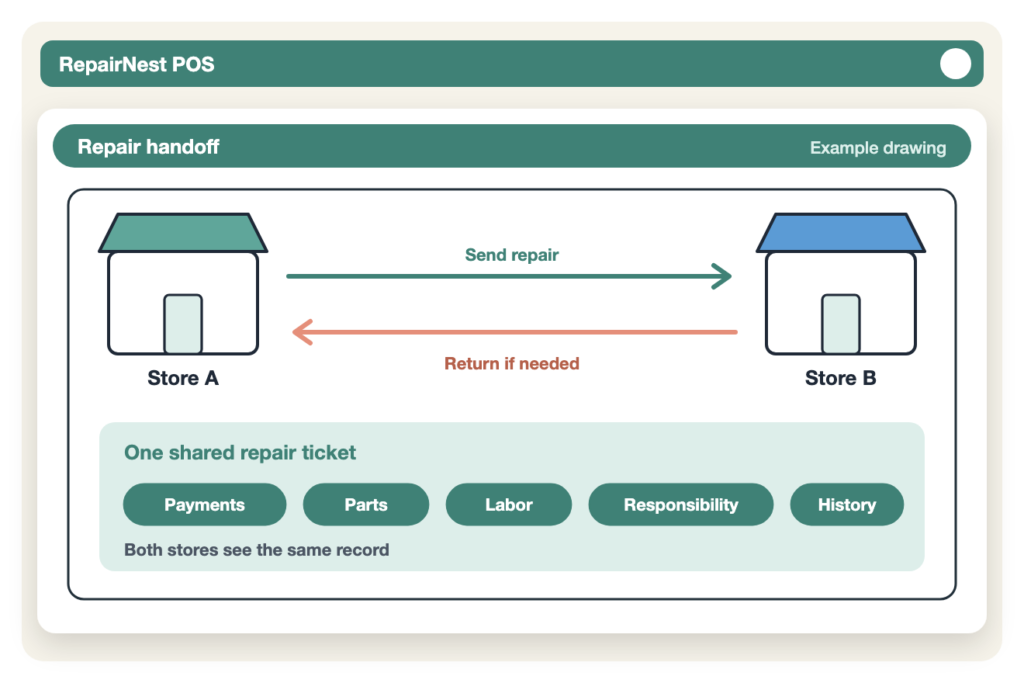
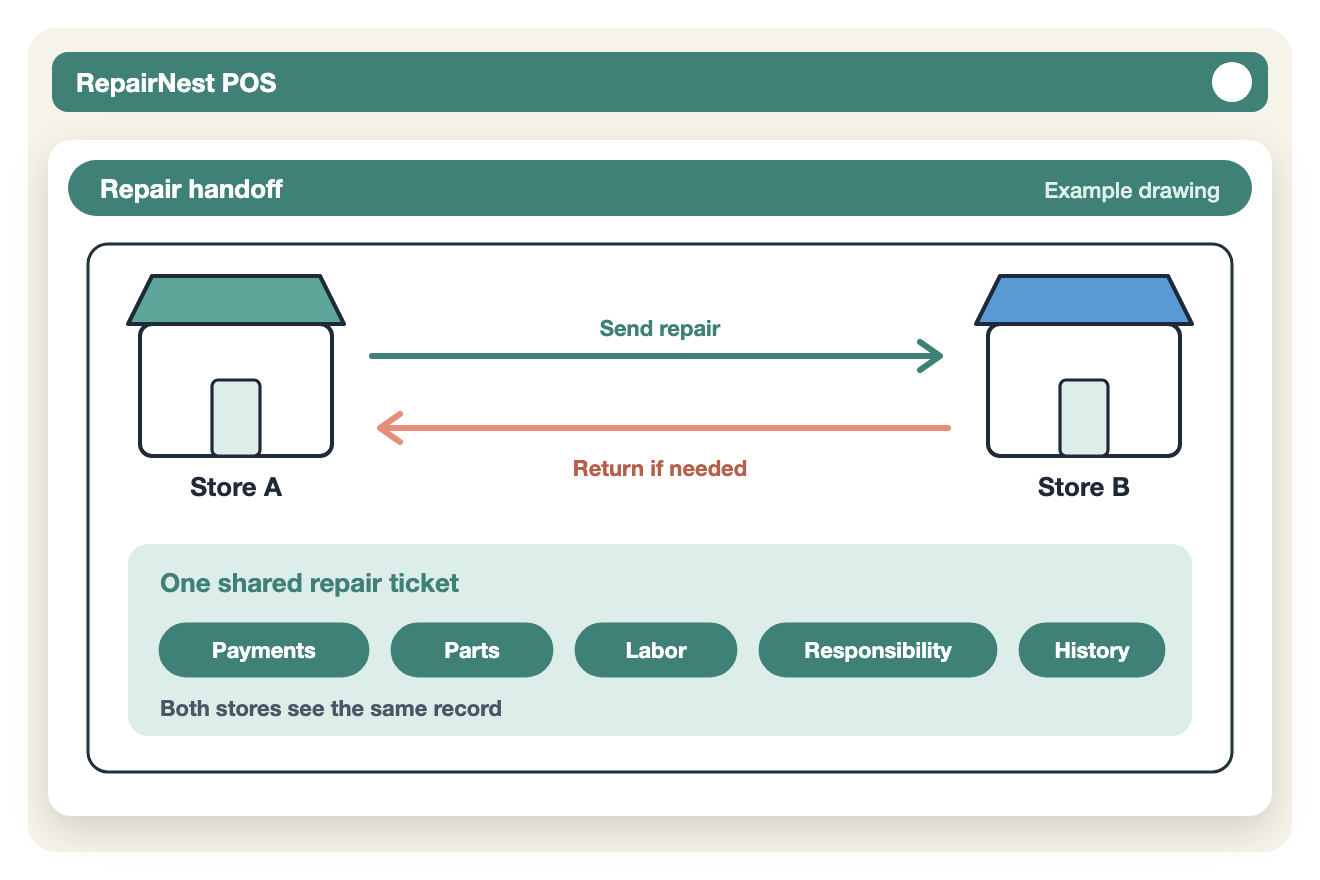
To run repairs across multiple locations, keep one repair ticket for each job and move that ticket with the device. Agree on when a repair should move, have the receiving store accept it before it travels, record which store is responsible at every moment, and credit each store for the deposits, parts and labor it handled. Tell the customer where to pick up before the device leaves the first store.
Why Repairs Move Between Stores
Once you have a second location, repairs start moving for good reasons. These are the three most common setups.
1. Specialist routing
One store has the technician who handles board work, water damage or game consoles. Other stores check those jobs in and send them to the right person, instead of turning the customer away.
2. A central repair hub
Your storefronts focus on sales and check-in, while one location does most of the bench work. This keeps expensive tools and experienced technicians in one place, and it is often how a growing shop adds a new storefront without hiring a full repair team for it.
3. Overflow and parts
One store is backed up, or it does not have the part while another store does. Moving the repair can be faster than making the customer wait.
What Goes Wrong Without a System
Most multi-store problems come from the same place: the repair moves, but the information does not.
- Duplicate tickets. Each store opens its own ticket. Notes, photos and status updates end up split between them, and neither one tells the whole story.
- Nobody owns the job. The first store thinks the second store has it. The second store has not looked at it yet. The customer hears two different answers.
- Lost devices. A phone that is between stores is the easiest one to lose track of. Our guide on preventing lost customer devices covers the basics that matter even more when devices travel.
- Confusing money. The deposit was paid at one store and the balance at another. At the end of the day, neither drawer makes sense without a phone call.
- Wrong inventory and costs. A part used at Store B gets deducted at Store A, or not at all, so stock counts and repair profit are both wrong.
A Simple Six-Step Repair Handoff
Use the same steps for every repair that changes location, and write them into your standard operating procedures so that every store follows them.
Step 1: Check in the device completely
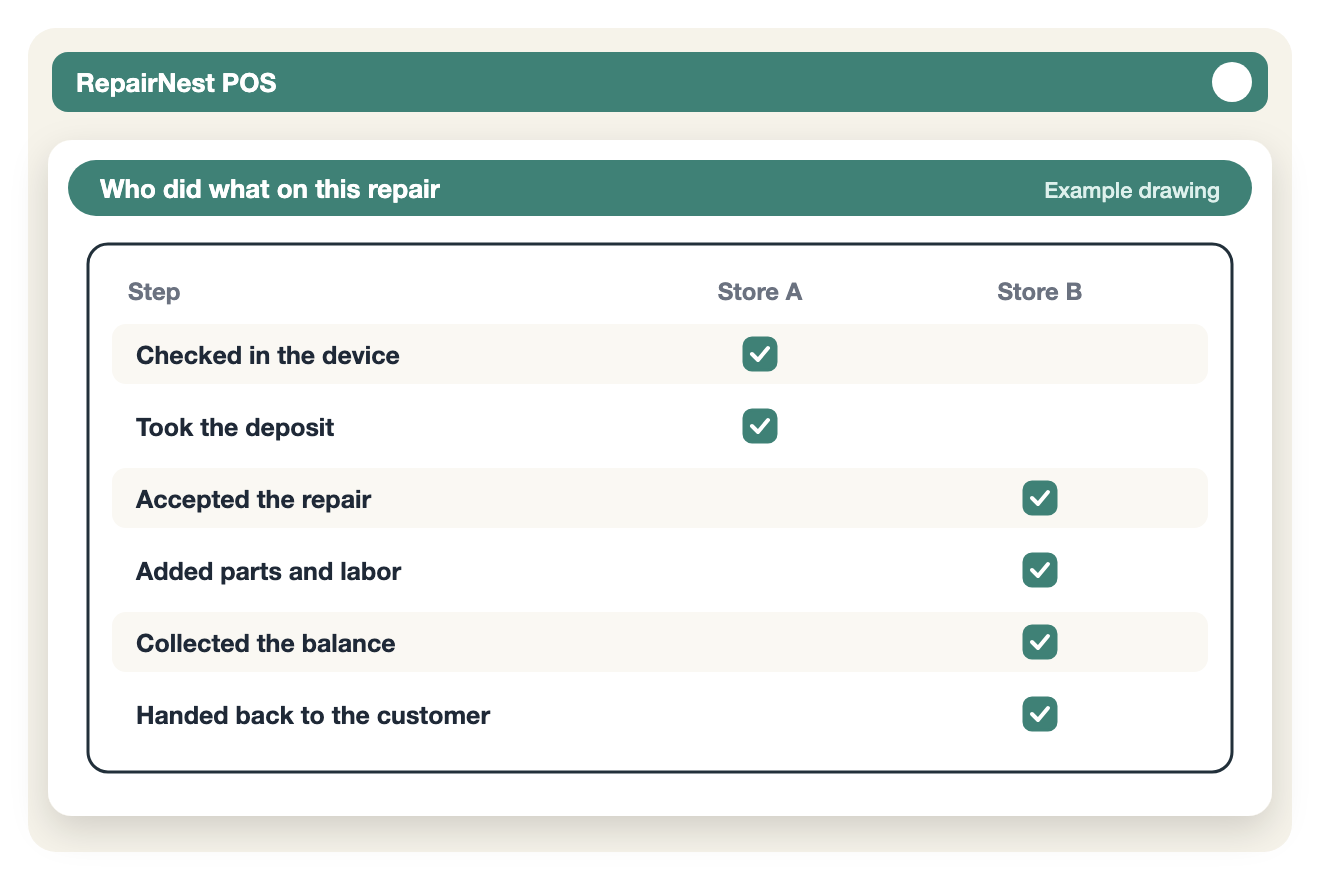
Record the customer, the device, the IMEI or serial number, the reported problem and the condition of the device before it goes anywhere. Take the deposit if your shop charges one. A careful check-in protects you if the device is questioned later, especially when another store will be the one opening it.
Step 2: Send the repair, not just the device
The receiving store should learn about the repair from your system, before the device arrives. That gives them time to check for parts and bench time, and it means nothing depends on a sticky note in a bag.
Step 3: Have the receiving store accept or decline
This step is the one most shops skip. Until someone at the receiving store accepts the repair, the sending store is still responsible for it. If the store cannot take the job, a clear decline sends it back to the first store right away, rather than leaving it sitting on a shelf.
Step 4: Protect the device in transit
Whoever carries the device should know exactly which devices they have. Use a sealed, labeled bag, match each device to its ticket, and confirm the count when it arrives. Keep this routine the same whether it is a staff member driving across town or a daily courier run.
Step 5: Do the repair on the same ticket
The receiving store adds its parts, labor and notes to the original ticket. Everything stays in one place, so anyone at either store can answer the customer’s question without calling the other location.
Step 6: Agree on pickup and final payment
Decide where the customer will collect the device. It may be the repairing store if that suits them, or the original store if the device needs to go back. Whichever store hands it over collects any remaining balance.
Decide Who Gets Credit Before You Need To
Disagreements between stores are usually about credit, not repairs. When one location does the selling and another does the fixing, each manager wants the job counted in their numbers. Settle this once, in writing, before it comes up.
- Payments: credit each deposit and balance to the store that actually collected it, so that every drawer balances at the end of the day.
- Parts: deduct parts from the inventory of the store that supplied them, so stock counts stay honest.
- Labor: record labor against the store and technician who did the work, so technician reports stay fair.
- The sale: choose a clear rule for where the repair sale is recorded, such as the store that started it or the store that finished it, and apply it every time.
If you use commissions, look at how a shared repair affects them too. A check-in employee and a technician at different stores may both expect credit, and it is easier to explain the rule in advance than after payday. For the same reason, it helps to know your true cost per job before you start moving repairs around. Our guide to pricing phone repairs shows how to work that out.
Keep the Customer’s Experience Simple
Your customer does not need to know how your stores work behind the scenes. They only need three things:
- Where their device is going, told honestly before it leaves. “Our board specialist is at our Oak Avenue store, and we can have it back here by Thursday” builds trust.
- Where to pick it up, confirmed again when the repair is finished.
- A clean receipt, showing what they paid for and what they still owe, without your internal transfer details.
Send the same status updates you would send for any other repair. A customer who gets a text saying the repair is finished rarely worries about which building it happened in.
What Owners Should Be Able to See
When you own several stores, you should be able to answer these questions without calling anyone:
- Where did this repair start, and which store is responsible for it right now?
- Has the receiving store accepted it, or is it still waiting?
- Where will the customer pick it up?
- Which store took which payment, and which store supplied the parts?
- How many repairs does each store send out, and how many does it take in?
That last question is useful for planning. If one store sends out most of its screen repairs, it may need more training or another technician. Combined reports show you totals, but only a shared repair record shows you how work actually moves through your business.

Mistakes to Avoid
- Creating a second ticket at the receiving store. It feels quick, but it splits the history and the money.
- Moving the device before the other store agrees. A repair that arrives unannounced tends to sit.
- Leaving transit untracked. Every device should have a clear owner at every moment, including while it is in a car.
- Promising a time you cannot meet. Add travel time to the estimate you give the customer.
- Letting each store make its own rules. A handoff only works if both sides follow the same steps.
Frequently Asked Questions
Can I start a repair at one location and finish it at another?
Yes, and many multi-store shops do. The important part is to keep one ticket for the job, so that the history, payments and parts stay connected when the device moves.
Which store should get credit for a repair done at two locations?
There is no single right answer, so choose a rule that suits how your stores are measured and apply it consistently. Credit each payment to the store that collected it and each part to the store that supplied it, then decide separately where the sale is recorded.
Should a small shop with two locations bother with a central repair hub?
It depends on your volume and your technicians. If one location already handles most difficult repairs, you may effectively have a hub. Start by routing only the specialist work, and expand if turnaround times hold up.
How do I stop devices getting lost between stores?
Give every device a clear owner at every step. Record the handoff, use labeled and sealed bags, count devices when they leave and when they arrive, and have the receiving store confirm that it accepted the repair.
How RepairNest POS Handles Multi-Location Repairs
In RepairNest POS, this is handled by multi-location repair handoffs. Store A can send a live repair to Store B without creating a second ticket. Store B gets a real-time notification and accepts or declines the repair. Once it accepts, Store B becomes the responsible location and can add its own parts, labor and service charges, collect the remaining balance, and hand the device to the customer or return it to Store A.
Both stores work from the same ticket and see the full location history. Deposits and balance payments stay attributed to the location that collected them, while the customer’s statement stays clean. It works alongside multi-location management for stock transfers between stores and inventory tracked by location.
Book a demo to see a repair move between two stores, try RepairNest POS yourself, or check the pricing page for plans.